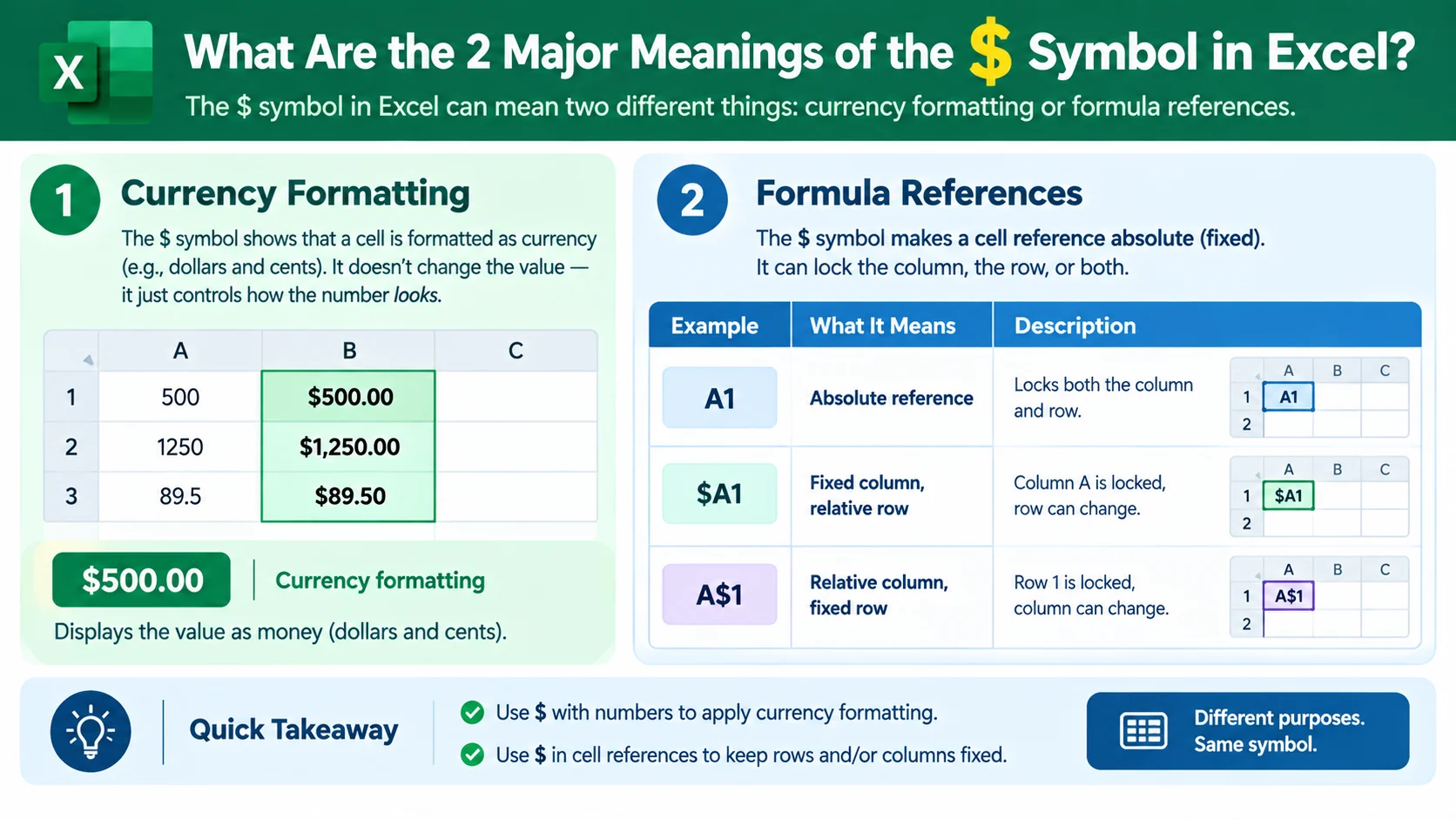
In Excel, the dollar sign $ has two main uses. It can lock a column or row in a formula, creating an absolute or mixed reference. It can also display numbers as currency, such as `$500. The meaning depends on where the symbol appears.
What does the money sign mean in excel depends on where you see the $ symbol. In a formula, it usually controls how a cell reference changes when you copy or fill the formula. In a formatted cell, it can simply display a monetary value.
This distinction matters because the same symbol can perform different jobs. For example, A1 locks both the column and row. Meanwhile, $A1 locks only the column. A value formatted as $1,500.00 uses the symbol as a currency display.
Therefore, seeing $ does not automatically mean that Excel is treating a number as money. Context determines its function.
Microsoft documents the dollar sign as part of Excel’s absolute and mixed cell reference system. Microsoft also documents Currency and Accounting formats as separate ways to display monetary values.
Quick Answer Box
| Meaning | Context | Primary Platforms | Example | Tone |
| Currency symbol | Number formatting | Excel desktop and web | $500.00 | Financial |
| Absolute reference | Formula | Excel desktop and web | A1 | Technical |
| Locked column | Formula | Excel desktop and web | $A1 | Technical |
| Locked row | Formula | Excel desktop and web | A$1 | Technical |
| Mixed reference | Formula | Excel desktop and web | $A1 or A$1 | Technical |
What does the money sign mean in excel?
The answer becomes simple once you separate currency formatting from cell references.
When $ appears next to a displayed number, Excel usually uses it as a currency symbol. For example, $250.00 tells the reader that the displayed amount uses a dollar currency format.
When $ appears inside a formula reference, it has a completely different purpose. It tells Excel which part of the reference should remain fixed when the formula moves.
For example:
=A1*B1
Both references are relative. If you copy the formula down one row, Excel changes them to:
=A2*B2
However, this formula behaves differently:
=A1*B1
Here, B1 remains fixed when you copy the formula. Microsoft calls this an absolute reference.
The Dollar Sign as a Currency Symbol
Suppose cell A1 contains:
1250
You can format the cell as currency. Excel may then display:
$1,250.00
The underlying value remains numeric. The $ symbol is part of the cell’s display format.
That distinction is important. Formatting changes how a value looks. It does not necessarily change the mathematical value stored in the cell.
Microsoft recommends using Currency or Accounting formatting when you want to display monetary values.
The Dollar Sign as a Formula Lock
Now consider this formula:
=A2*D1
The $ symbols lock both parts of D1.
The column D stays fixed.
Row 1 stays fixed.
Consequently, copying the formula down keeps D1 unchanged.
This technique is especially useful for tax rates, discount percentages, conversion factors, commission rates, and other values that apply repeatedly.
Absolute, Relative, and Mixed References
Excel uses three major reference types.
| Reference | Column | Row | What happens when copied |
| A1 | Relative | Relative | Both can change |
| A1 | Fixed | Fixed | Neither changes |
| $A1 | Fixed | Relative | Row can change |
| A$1 | Relative | Fixed | Column can change |
Microsoft describes A1 as an absolute reference. It describes $A1 and A$1 as mixed references.
Contextual Dynamics and Nuances of the Term
Understanding what the money sign means in excel requires looking at the symbol’s location.
A $ before a number often signals currency formatting. A $ before a column letter or row number usually signals a locked formula reference.
For example:
$2,500.00
This is a displayed monetary amount.
By contrast:
B4
This is a cell reference with both its column and row locked.
The two expressions look similar. However, Excel interprets them differently.
When $ Appears Before a Number
A displayed value such as $75 normally represents a monetary amount.
The currency format can control several details. These include decimal places, negative number styles, and the currency symbol.
You can select a cell and open the formatting options through the Number section. Microsoft also documents Ctrl+1 as a shortcut for opening the Format Cells dialog.
When $ Appears Before a Column
Consider:
$C5
The $ locks column C.
If you copy the formula horizontally, the column remains C. However, the row can change when the formula moves vertically.
For example, a formula containing $C5 could become $C6 when copied down.
When $ Appears Before a Row
Now consider:
C$5
The row number stays fixed at 5.
If you copy the formula across columns, the column can change. If you copy it vertically, the row remains 5.
This technique works well for multiplication tables, pricing grids, and formulas that combine row and column headings.
When Both Parts Use $
The reference:
C5
locks both dimensions.
It remains C5 when you copy the formula horizontally, vertically, or diagonally.
Microsoft describes this behavior as an absolute reference.
Currency Format Versus Accounting Format
Excel provides both Currency and Accounting formats.
| Feature | Currency | Accounting |
| Displays currency | Yes | Yes |
| Currency symbol | Near the value | Aligned in the column |
| Decimal control | Yes | Yes |
| Negative values | Multiple display choices | Commonly shown in parentheses |
| Best use | General monetary values | Financial reports |
Microsoft notes that Accounting formatting aligns currency symbols and decimal points across a column. Currency formatting places the symbol next to the first digit.
Therefore, the visual $ symbol alone does not tell you which number format the workbook uses.
Real Life Conversation Examples Using what does the money sign mean in excel
Because the phrase refers to an Excel function rather than internet slang, conversations about it usually happen in work, school, accounting, finance, or spreadsheet support.
Scenario 1: A Formula Does Not Copy Correctly
Alex: My formula works in the first row, but the numbers become wrong when I drag it down.
Jordan: Check whether the fixed value uses dollar signs.
Alex: You mean something like B2?
Jordan: Exactly. That locks both the column and row.
Alex: So the reference will stay on B2?
Jordan: Yes. Excel keeps pointing to that cell when you copy the formula.
Scenario 2: A Number Suddenly Shows a Dollar Sign
Maya: Why does my cell now show $250.00?
Chris: The cell probably has Currency formatting.
Maya: Did Excel change the actual number?
Chris: No. The formatting changes how the value appears.
Maya: So I can switch it back to General?
Chris: Yes. That removes the specific currency display.
Scenario 3: A Tax Rate Is Used Repeatedly
Sam: I put the tax rate in B1.
Taylor: Then you can lock B1 in your formula.
Sam: Like =A2*B1?
Taylor: Exactly. When you fill the formula down, B1 stays fixed.
Sam: That makes sense. The sales value changes, but the tax rate does not.
Scenario 4: A Spreadsheet Uses $A1
Jordan: Why does this formula have only one dollar sign?
Casey: It is a mixed reference.
Jordan: What does that lock?
Casey: $A1 locks column A but allows the row to change.
Jordan: So copying down can change 1 to 2?
Casey: Correct. The column stays A.
Scenario 5: A User Searches for the Meaning
Chris: What does the money sign mean in Excel?
Dana: It depends on where you see it.
Chris: How so?
Dana: Next to a number, it can represent currency formatting. Inside a formula reference, it can lock a row or column.
Chris: So $500 and A1 mean different things?
Dana: Exactly. The first displays money. The second locks a cell reference.
Platform Specific Breakdown
The phrase is about Microsoft Excel rather than a social media slang term. Therefore, Snapchat, TikTok, Instagram, and texting do not give the $ symbol a special Excel meaning.
Still, people may discuss Excel formulas across those platforms. The important point is that the technical meaning comes from Excel’s formula and formatting rules.
How It Is Used on Snapchat
If someone sends an Excel screenshot through Snapchat, the $ symbol keeps its normal Excel meaning.
For example:
=A2*B1
The B1 reference still locks cell B1.
The messaging platform does not change the spreadsheet logic.
A screenshot might also show values such as:
$49.99
$125.00
$2,500.00
Those dollar signs generally represent currency formatting.
Therefore, the context remains the spreadsheet itself.
The Role of what does the money sign mean in excel on TikTok
TikTok creators sometimes explain spreadsheet tips through short videos. However, TikTok does not define the Excel symbol.
If a video shows:
=A2*C1
the $ characters have their normal Excel reference meaning.
Microsoft’s documentation confirms that dollar signs can make a reference absolute or mixed.
This distinction matters because social media explanations can simplify technical concepts. A short video may say that $ means “lock the cell.” That is useful shorthand, but it can hide an important detail.
A single $ can lock only the column or only the row.
Two $ symbols can lock both.
Instagram and Texting Dynamics
People may use Instagram messages or text conversations to ask Excel questions. The platform itself does not change the symbol’s meaning.
For example:
Text: “Why is my formula changing when I drag it?”
Reply: “Try locking the reference with $, such as B2.”
That advice refers to Excel’s formula behavior, not texting slang.
Likewise, someone might send:
“Why does my spreadsheet show $1,000?”
The answer may involve Currency or Accounting formatting.
Microsoft states that both formats can display monetary values, although they arrange the currency symbol differently.
Alternative Meanings and NLP Variations of the Phrase
Searchers may describe the same Excel issue in many ways.
Common variations include:
| Search phrase | Likely intent |
| What does the money sign mean in Excel? | General explanation |
| What does $ mean in Excel? | Formula reference or currency |
| What does the dollar sign do in Excel? | Formula behavior |
| What does A1 mean? | Absolute reference |
| Why does Excel have dollar signs? | Reference locking |
| How do I lock a cell in Excel? | Absolute reference |
| What does $ before a cell mean? | Formula reference |
| How do I keep a cell fixed in Excel? | Copying formulas |
| Why is Excel showing dollar signs? | Currency formatting |
| How do I remove $ from Excel? | Number formatting |
These queries share a semantic relationship, but they do not always describe the same problem.
For example, “How do I remove the dollar sign?” may involve formatting. “How do I lock a cell?” involves formula references.
Dollar Sign
The terms dollar sign, money sign, and currency symbol can refer to $ in everyday language.
However, Excel users often need more precise terminology.
Absolute Reference
An absolute reference locks both the column and row.
Example:
A1
Mixed Reference
A mixed reference locks one dimension but not the other.
Examples:
A1A1
Currency Formatting
Currency formatting changes the way Excel displays numerical values.
Example:
1500
can appear as:
$1,500.00
The value remains numerical unless other operations convert it into text.
Misinterpretations: When NOT to Use what does the money sign mean in excel
A common mistake is assuming that every $ in Excel represents money.
That assumption fails inside formulas.
For example:
=A1*B1
The $ characters do not mean that B1 contains dollars.
Instead, they tell Excel how to handle the reference when the formula moves.
Another mistake involves typing currency symbols directly into formulas.
Microsoft advises against entering numbers with dollar signs inside formulas because $ has a reference meaning there. Instead, enter the numeric value and apply formatting afterward.
For example, this is not the preferred approach:
=A1*$5
Instead, use a numeric value or reference a cell:
=A1*5
or:
=A1*B1
where B1 contains the relevant numeric constant.
Do Not Confuse Formatting With Value
Suppose a cell displays:
$500.00
The displayed appearance does not mean that Excel stores the value as a text string.
In normal Currency formatting, the underlying value can remain numeric.
That means functions such as SUM can continue to operate on the value.
Do Not Assume One Dollar Sign Means Full Locking
This is another frequent misunderstanding.
Compare:
$A1
with:
A1
The first locks the column only.
The second locks both the column and row.
Likewise:
A$1
locks the row only.
Microsoft provides these distinctions in its reference documentation.
How to Respond in Chat Comfortably
If someone asks what does the money sign mean in Excel, the most useful response starts with the context.
A concise answer could be:
“It depends on where the $ appears. In a number such as $500, it usually represents currency formatting. In a reference such as A1, it locks the column and row so the reference does not change when you copy the formula.”
If they show a formula, explain the reference directly.
For example:
=A2*B1
You could explain:
“A2 is relative, so it can change when you copy the formula. B1 is absolute, so Excel keeps pointing to B1.”
If they show a formatted value instead, explain the number format.
For example:
$1,250.00
You could say:
“That dollar sign is part of the currency display format. It does not necessarily mean the value has become text.”
A Simple Three Question Diagnostic
When troubleshooting, ask:
- Is the $ next to a number?
- Is the $ inside a formula?
- Does the formula change when copied?
If the $ appears next to a number, investigate formatting.
If it appears before a column or row reference, investigate absolute or mixed references.
If the formula changes unexpectedly, inspect the reference type.
How to Lock a Cell
Suppose the tax rate sits in B1.
You want each sales amount in column A to use that same rate.
Use:
=A2*B1
Then fill the formula downward.
The A2 reference changes to A3, A4, A5, and so on.
The B1 reference stays fixed.
Microsoft also documents F4 as a shortcut for switching reference types in supported Excel environments.
FAQs
1. What does the money sign mean in Excel?
It depends on the location of the symbol. In a displayed amount, $ generally represents currency formatting. Inside a formula reference, it can lock a row, column, or both.
2. What does A1 mean in Excel?
A1 is an absolute reference. Both the column A and row 1 remain fixed when you copy or fill the formula.
3. What does one dollar sign mean in Excel?
One $ can create a mixed reference. For example, $A1 locks column A, while A$1 locks row 1.
4. Why does Excel put a dollar sign before a number?
Excel may display a dollar sign because the cell uses Currency or Accounting formatting. The formatting controls the appearance of the number.
5. How do I remove the dollar sign from Excel?
Select the cells and change the number format. You can use General or another suitable number format instead of Currency or Accounting.
6. Does a dollar sign make a cell value text?
Not necessarily. Currency formatting can display a numeric value with a dollar symbol while keeping the underlying value numeric.
7. How do I keep a cell from changing when I copy a formula?
Use an absolute reference such as B1. Excel then keeps both the column and row fixed when the formula moves.
8. What is the difference between $A1 and A$1?
$A1 locks column A but allows the row to change. A$1 locks row 1 but allows the column to change.
9. Can I use the dollar sign for currencies other than US dollars?
Yes. Excel’s number formatting lets you select available currency symbols. The exact options depend on the Excel environment and regional settings.
10. Is the dollar sign an Excel operator?
No. In a cell reference, $ controls reference behavior. It does not perform addition, subtraction, multiplication, or division.
Conclusion:
The phrase what does the money sign mean in excel can point to two different Excel concepts. The first involves currency formatting. The second involves formula references.
The difference becomes clear when you inspect the symbol’s location.
A value such as $750.00 usually uses a currency or accounting format. The $ helps communicate that the number represents money.
A reference such as A1 serves a different purpose. It tells Excel to keep the referenced column and row fixed when a formula moves.
Likewise, $A1 locks only the column. A$1 locks only the row. These mixed references provide more control when formulas move across spreadsheets.
Consequently, understanding the $ symbol can prevent many formula errors. It also makes copied formulas easier to build and audit.
For financial worksheets, formatting also matters. Currency formatting displays monetary values clearly. Accounting formatting provides aligned symbols and decimal points for structured financial reports. Microsoft documents both options as standard Excel number formats.
The most important lesson is simple: do not interpret $ based only on its appearance. Check the context.
If it appears beside a displayed number, think about currency formatting.
If it appears inside a cell reference, think about locking.
That distinction answers what does the money sign mean in excel and provides the foundation for working confidently with Excel formulas, budgets, reports, pricing sheets, tax calculations, and financial models.
